

Bringing AI contract review into Microsoft Word
For product leaders adding AI to professional software, usefulness depends on how well it fits the work. Telos helped build contract review, drafting, and redlining inside Microsoft Word, where lawyers already read and negotiate agreements.
The challenge
Connect a review suggestion to an edit a lawyer can use.
Contract review depends on the document, the party being represented, and the organization's negotiating requirements. A lawyer needs to understand a suggestion, inspect its reasoning, and decide what to do with it.
Working inside Word adds another requirement: changes must connect to the right document text. Paragraphs, formatting, tracked changes, and edits made during a review all matter to the experience.
The work
Turn review guidance into reusable playbooks.
Telos helped develop a playbook system that organizes review instructions into rules. Teams can use standard playbooks or configure their own requirements. Reviews produce issues that users can inspect, apply, ignore, or resolve manually.
Keep questions and follow-up work close to the document.
The assistant supports document questions, drafting, redlining, and follow-up conversations. A lawyer can move from a review finding to a more specific question without reconstructing the task in a separate application.
Build the connection between analysis and editing.
The implementation handles document text, paragraph references, and the application of suggested changes through the Word add-in. Continued work addresses the practical cases that arise when documents and reviews change over time.
The shared capabilities support SimpleAI and the Law Insider AI experience, with product-specific presentation and access.
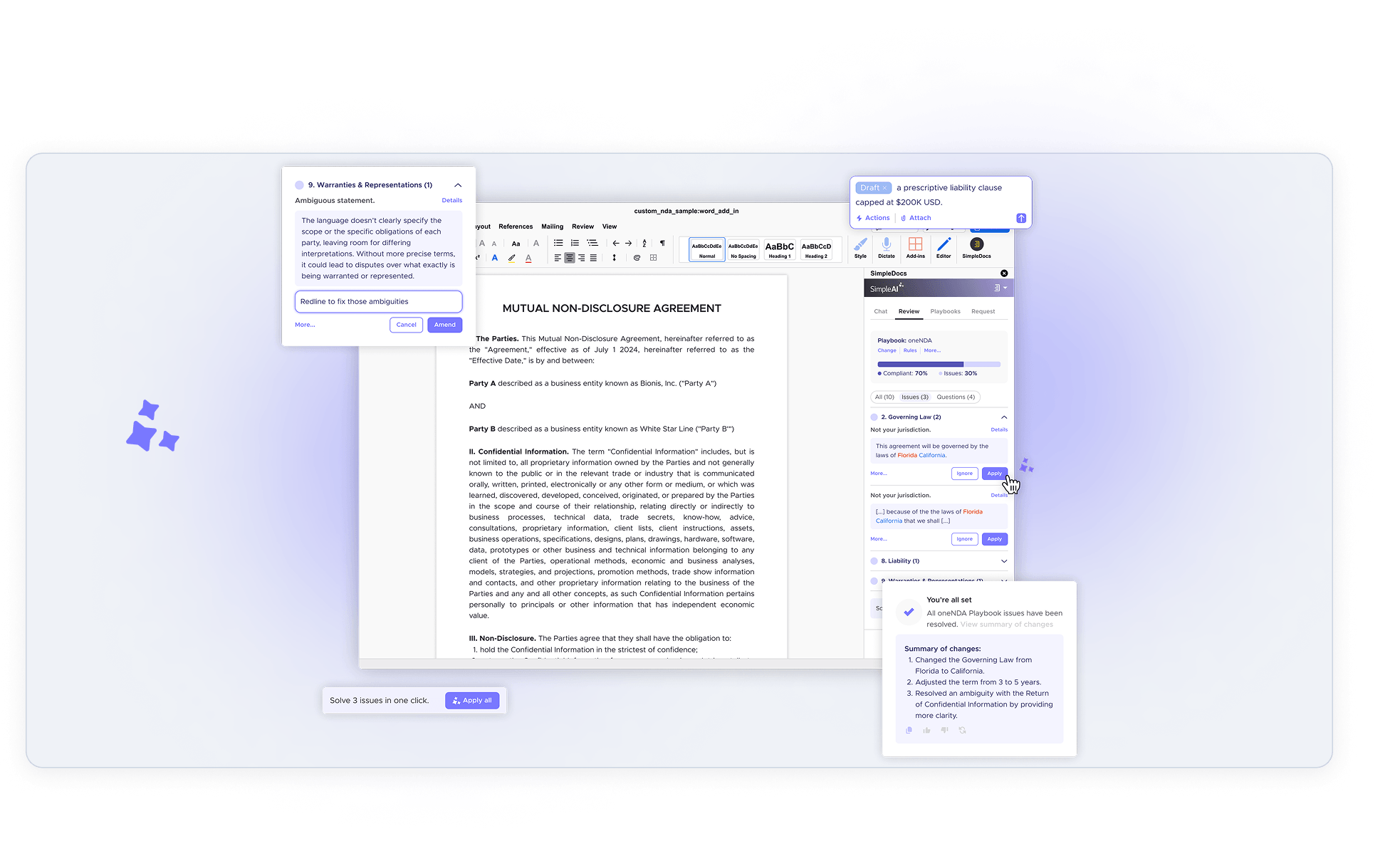
What the product supports
- Review against standard or custom playbook instructions.
- Suggested edits and review findings with resolution states.
- Questions and follow-up conversations about the document.
- Drafting and redlining within the Word experience.
- Applying changes while keeping the lawyer involved in the decision.
The result
AI assistance connected to the review process.
The resulting product brings review guidance, document context, and editing actions into one working environment. Lawyers can inspect the analysis and act on it in Word while retaining responsibility for the agreement.
Explore related projects
Contract intelligence · AI products
Evidence for contract negotiations
Compare language with relevant precedents and Law Insider data to support review and drafting decisions.
AI engineering · Evaluation systems
Quality controls behind legal AI
Evaluate prompts and models with structured test cases, version management, and release checks.

Where should AI fit into your users' work?
You need an experience that connects the model's output to a useful next action. Start with the task and the tools your users already depend on.